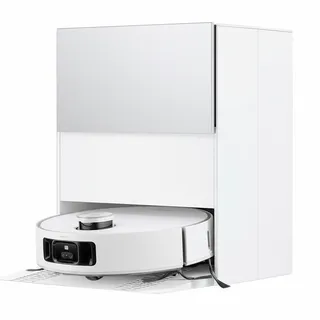
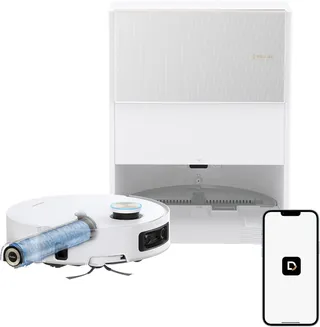
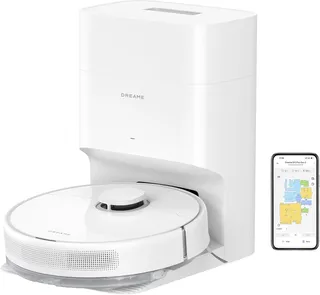
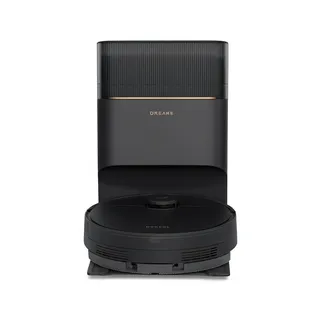
Dreame L40s Ultra CE
- mopping self empty mop washing mop drying lidar obstacle avoidance no go zones multi floor carpet boost
Released 2025
Suction
13,000 Pa
Battery
260 min
Navigation
Spinning Lidar
Mopping
2 Spinning Pads
Full Specifications
| Suction Power | 13,000 Pa |
| Battery Life | 260 min |
| Dustbin Capacity | 320 ml |
| Navigation | Spinning Lidar |
| Robot Height | 4.1" |
| Threshold Climbing | 20 mm |
| Brush Roll | Single |
| Mopping | 2 Spinning Pads |
| Mop Raising Height | 10.5 mm |
| Self-Empty Dock | Bagged |
| Dock Bag Capacity | 3.2 L |
| Mop Washing | Yes |
| Mop Drying | Yes |
| Obstacle Avoidance | Yes |
| Multi-Floor Maps | Yes |
| No-Go Zones | Yes |
| Carpet Boost | Yes |
| HEPA Filter | Yes |
| WiFi | 2.4 GHz |
| Voice Assistants | Alexa |
| Warranty | 1 year |
Compare with similar models:
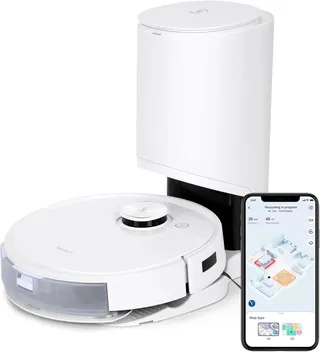
The Dreame L40s Ultra CE packs flagship features into a mid-range price tag, making it one of the more compelling all-in-one robot vacuums on the market. Launched in June 2025 as the budget-minded option in Dreame’s L40s lineup, it skips the AI camera found on pricier siblings but keeps the fully automated cleaning experience that makes modern robot vacuums genuinely useful.
What You’re Getting
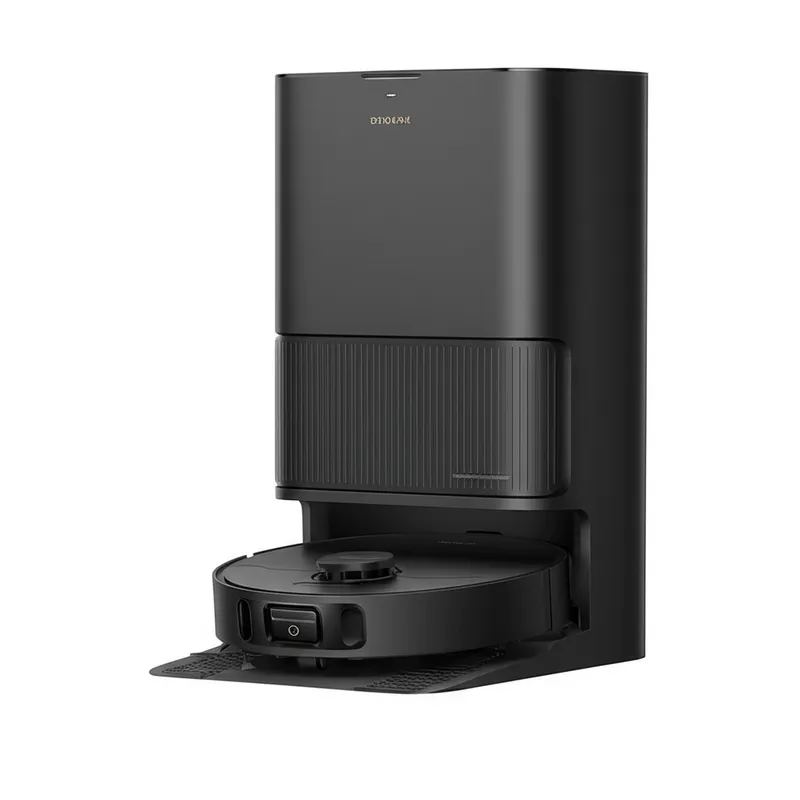
This robot does everything you’d expect from a premium unit: it vacuums, mops with dual spinning pads, empties its own dustbin, washes and dries its mop pads, and navigates your home with laser precision. The catch? It lacks the AI-powered obstacle avoidance of the L40s Ultra AE, which means cables and socks become its kryptonite. More on that later.
Pricing hovers around $500-$550 after discounts in most markets, though MSRP sits closer to $679-$699. The CE variant (sometimes called Compact Edition or Complete Edition) carries CE certification for European markets but sells in North America too. It comes in black or white, with identical specs for both colors.
Hardware That Delivers
Suction and Cleaning Power
The 13,000 Pa peak suction sounds impressive on paper, and it translates well to real-world performance. Independent testing showed the CE removing about 89% of embedded sand from carpet, which actually ties or beats many competitors. That’s only slightly behind the flagship L40s Ultra’s 92% result. The lower spec number compared to siblings (which boast 19,000 Pa) hasn’t hurt its practical cleaning ability much.
Some retailers mistakenly list 19,000 Pa for the CE. That’s wrong. The CE runs at 13,000 Pa. Still plenty of power for everyday messes.
The Brush System
The single TriCut main brush deserves special mention. This bristle-rubber hybrid includes a built-in hair-cutting mechanism that actively slices through tangled strands as it rotates. After five months of use, one owner with long-haired family members and pets reported zero tangles on the brush roller. That’s remarkable for any vacuum, let alone a robot.
The 320 ml dustbin is small, but auto-emptying after each cleaning run means it rarely matters. A single side brush on the right sweeps debris toward the suction path. Unlike premium models, this side brush doesn’t extend, which does affect edge cleaning somewhat. Users have noticed it leaves a narrow strip along baseboards untouched.
Navigation
LiDAR navigation using a spinning laser turret maps your home with centimeter-level accuracy, even in complete darkness. The robot builds an efficient cleaning pattern, systematically covering rooms rather than bouncing randomly. Initial firmware had some pathing issues where it only made horizontal passes and occasionally missed spots. A firmware update in 2025 added crosshatch cleaning that improved coverage significantly.
Mapping happens fast. In quick mapping mode, the robot can scan a typical floor in under 10 minutes. The app stores up to three floor plans, so multi-story homes work fine. Just carry the robot upstairs and it recognizes which map to use.
What It Can and Can’t Avoid
Here’s where expectations need adjusting. The CE uses a 3D infrared sensor for obstacle detection, not the AI camera found on the AE model. It handles furniture legs, walls, and larger items well enough. But small objects? Not so much.
Vacuum Wars scored the CE’s obstacle avoidance at 8 out of 24, one of the lowest results on record. The AE model, with its AI camera, scored 19 out of 24. The practical difference: the CE will often bump into, push around, or try to eat phone charging cables, socks, pet toys, and other floor clutter. It can’t identify pet waste either, which creates obvious risks if accidents happen.
The robot senses something and goes around it. It just doesn’t know what that something is. If a cable gets into the main brush, the TriCut mechanism might actually cut through thin cords (not good for the cord) or it’ll tangle and stop. Robot-proofing your floors before cleaning runs makes a real difference with this model.
Carpet Detection
An ultrasonic sensor on the underside detects carpet transitions automatically. When it crosses onto a rug, two things happen: suction increases for better vacuuming, and the mop pads lift about 10.5 mm (0.41 inches) to avoid wetting the carpet. This works well for low-pile rugs and door mats. Medium or high-pile carpets should be set as no-mop zones in the app since the lift height won’t clear them completely.
Battery Life and Coverage
The 5,200 mAh battery delivers around 180 minutes of cleaning in normal mode on mixed floors. Dreame’s marketing claims 260 minutes, but that’s under ideal conditions: quiet mode, hard floors only, no mopping. More realistic expectations land around three hours.
That runtime covers approximately 1,900-2,000 square feet on a single charge. Larger homes or deep cleaning modes that make two passes will require a recharge mid-job. The robot handles this automatically, returning to base when battery drops below 20%, charging up, then resuming where it left off.
Charging takes about four hours from empty to full. The robot won’t necessarily wait for 100% if it only needs a top-off to finish the job.
Mopping That Actually Works
The Dual Pad System
Two circular microfiber pads spin at the rear, rotating in opposite directions to create scrubbing action. They measure about 5.5 inches (14 cm) in diameter and attach via velcro. The robot can mop while vacuuming simultaneously or run dedicated mopping passes.
A RoboSwing maneuver helps with corners. The robot periodically swings one side toward walls, letting a spinning pad contact baseboards. It’s not as effective as an extending mop design would be, but it makes a noticeable difference compared to robots without this feature.
For everyday mopping, dried water spots, footprints, and light grime, the system performs well. Hardened stains like dried sauce or paint still need manual attention. Review consensus: the CE keeps floors looking fresh between proper manual moppings and dramatically reduces how often you need to break out a mop yourself.
Water Management
The base station holds 4.5 liters of clean water and 4 liters of dirty water. That’s enough clean water to mop roughly 200 square meters (2,150 square feet) depending on water usage settings. Most users refill every one to two weeks with regular use.
The robot carries a small onboard reservoir (around 80-150 ml) that the base automatically refills as needed. Water usage is adjustable through the app with low, medium, and high settings. The CE tends to use more water than the AE model to compensate for not having automatic detergent, which made it slightly less “efficient” in some testing metrics even though it cleaned well.
The Detergent Question
Here’s something buyers should know upfront: the CE doesn’t include automatic detergent dispensing out of the box. The dock supports a dispenser module, but it’s sold separately for around $39 and isn’t available in all regions. By default, you’re mopping with plain water.
Many CE owners are fine with water-only mopping. Others manually add a small amount of floor cleaning solution to the clean water tank (though Dreame warns against non-approved formulas that might leave residue or clog pumps). If mopping performance on tough stains matters a lot to you, this is worth considering. The lack of detergent does limit effectiveness on oily or sticky messes.
Automatic Cleaning and Drying
After mopping, the robot returns to base where its pads spin against a textured washboard while water jets rinse them. The dirty water gets suctioned into the waste tank. Then warm air dries the pads for about two hours to prevent mildew and odor.
The CE washes with room-temperature water. Higher-end models in Dreame’s lineup use 75°C (167°F) hot water for more sanitizing power. Despite the cooler wash temperature, owners report pads come out clean and nearly odor-free. The warm air drying is effective at preventing that musty mop smell that plagued earlier robot mop generations.
The App Experience
The Dreamehome app (iOS and Android) provides granular control over nearly every aspect of operation. You can name rooms, set different cleaning parameters for each space, create no-go zones and no-mop zones, schedule specific rooms at specific times, and adjust suction and water levels.
The learning curve is real. There are many menus and settings, which can overwhelm new users. But once you’ve spent time with it, daily operation doesn’t require much fiddling. Set schedules, occasionally tweak a zone, respond to maintenance alerts.
Connection requires 2.4 GHz Wi-Fi (no 5 GHz support). Setup involves scanning a QR code on the robot, connecting to its temporary network, and following prompts. Most users report the process goes smoothly.
Voice Control
The CE works with Amazon Alexa, Google Assistant, and Siri (via Shortcuts). Basic voice commands like “start vacuuming” or “clean the living room” work once you’ve linked accounts. More advanced commands like changing suction levels or specifying zones typically aren’t available through voice. No Apple HomeKit or Matter support exists currently.
What’s Missing
No on-board camera means no remote viewing or two-way audio. You can’t drive it around to check on pets or use it as a mobile monitor. Some buyers specifically want this privacy-focused approach. Others will miss the feature.
The app has mixed reviews (around 3 stars on Google Play). Common complaints involve connectivity hiccups and occasional server-related issues. Most users find it works reliably after initial setup, though the robot does require cloud connectivity for app features. If your internet goes down, you can still start cleaning with the physical button, but schedules and remote control won’t work until connectivity returns.
The Base Station
This is a substantial piece of equipment. At 340 mm wide, 457 mm deep, and 590 mm tall (roughly 13.4” x 18” x 23.2”), it needs a dedicated spot in your home. Weight is 8.3 kg (18.3 lbs) empty. Think of it as a small appliance that requires similar floor space to a compact side table.
Automatic Emptying
A powerful vacuum in the dock sucks debris from the robot’s dustbin into a 3.2-liter disposable bag. Dreame claims this supports up to 100 days of hands-free operation. Reality depends on your home: households with shedding pets or lots of debris might fill the bag in one to two months, while a small apartment with light dust could stretch to three months.
The emptying process is loud, around 80 dB for about 10 seconds. That’s enough to startle pets or sleeping family members. The app lets you disable auto-emptying during certain hours or close a door during runs to manage this.
Maintenance Tasks
Despite the “hands-free” marketing, you’ll still need to refill clean water (roughly every one to two weeks), empty dirty water (similar frequency), and replace dust bags when full. The app alerts you to each of these needs. Every so often, remove the washboard panel in the base and rinse it, wipe any residue from the water area, and check the suction inlet for clogs. Monthly attention keeps everything running smoothly.
Water tanks lift out easily for filling and emptying. The dust bag seals when removed for hygienic disposal.
Cleaning Performance
What It Handles Well
Fine dust on hard floors disappears completely, especially with the mop assist. On carpets, independent testing showed above-average performance at pulling embedded grit from low and medium pile. Sand, crumbs, cereal, rice, cat litter on hard surfaces, daily pet hair: all handled competently.
The vacuum-mop combination leaves hard floors with a just-cleaned sheen. The slight moisture doesn’t pool or damage wood flooring because the pads are damp rather than wet.
Where It Struggles
Pet hair on carpet gets complicated. The CE removed about 68% of embedded pet hair from carpet in testing, below the 81% average. The TriCut brush is optimized to avoid tangling by not wrapping hair excessively. It cuts hair into smaller pieces, some of which it picks up and some of which might remain for subsequent passes.
Edge and corner cleaning is decent but not exceptional. Without the extending side brush found on pricier models, a thin line of dust can remain along walls. Round robot geometry means sharp corners always have small triangles of untouched area. The RoboSwing mopping maneuver helps with baseboards, but expect to occasionally vacuum corners by hand.
Deep cleaning of thick carpets isn’t this robot’s strength. It’ll vacuum the surface and grab loose debris, but embedded dirt in plush carpet may partially remain. If your home is mostly high-pile carpet, a dedicated carpet vacuum would serve you better.
Pet Owners: What You Should Know
The TriCut brush is a genuine advantage for pet households. Whatever hair the robot picks up won’t wrap around the brush and require cutting off later. The auto-empty system means you’re not handling clumps of pet fur manually.
The quiet operation (55-61 dB during normal cleaning) tends not to frighten cats or dogs. Most pets adapt quickly, ignoring the robot or watching it with mild curiosity.
The serious consideration: no poop detection. Without an AI camera, the CE can’t identify pet accidents. If your puppy isn’t fully house-trained, running this robot unsupervised carries smearing risk. Many pet owners never encounter this issue, but it’s worth factoring into your decision. You can schedule runs during walks when the dog is out, or simply ensure pets are reliable before trusting unsupervised cleaning.
The app lets you mark pet zones like feeding stations as no-go areas to prevent the robot from bumping water bowls.
Who Should Buy This Robot
The L40s Ultra CE makes sense if you have mixed flooring (hard floors plus low-pile rugs), want genuine automation without daily intervention, and don’t mind doing light floor prep before cleaning runs. It’s particularly good for busy families who want consistently clean floors without dragging out a vacuum and mop, pet owners who hate dealing with hair tangles on brushes, and larger homes that benefit from the long battery life and self-emptying capability.
The value proposition is strong. For roughly $500-600, you get a full suite of features that cost $1,000+ just a couple years ago.
Who Should Look Elsewhere
If your floors are constantly cluttered with cables, toys, and random objects, the CE’s limited obstacle avoidance will frustrate you. Consider the L40s Ultra AE (about $100-150 more) for its AI camera, or be prepared to tidy up before each run.
Homes that are mostly high-pile carpet won’t benefit from the mopping system, and the vacuum won’t extract as deeply as a powerful upright or a dual-brush robot like certain Roomba models.
If pet accidents are a realistic concern in your household, the lack of waste detection is a meaningful drawback. Models with AI cameras provide more peace of mind.
Competition
The Roborock Q Revo offers similar features at a comparable price point when on sale, with slightly better edge cleaning but less suction and no hot air drying. Dreame’s own L40s Ultra AE costs modestly more and adds AI obstacle avoidance plus higher suction, making it arguably better value if you can stretch the budget. The Ecovacs X1 Omni sometimes drops to similar prices and includes AI, but has more maintenance quirks.
For pure value in an all-in-one robot vacuum and mop with auto-empty and auto-wash, the CE remains hard to beat at its price point.
Known Limitations
The obstacle avoidance limitation is the big one. Small objects, cables, and pet toys will cause problems. This isn’t a defect; it’s the trade-off for the lower price compared to AI-equipped models.
Some early users reported the robot cleaning slower than expected, apparently due to the CleanGenius mode prioritizing thoroughness over speed. Switching to standard room mode speeds things up.
Edge cleaning could be better. Some owners noticed debris left along walls, particularly when floor trim matches the wall color. Enabling Edge Clean mode and doing room-by-room runs helps.
The lack of included detergent dispensing means water-only mopping by default, which underwhelms some users expecting better stain removal.
Warranty and Support
Dreame offers a one-year limited warranty (two years in the EU under consumer law). Extended warranties are available for purchase: an extra year runs $69, two extra years cost $139.
Support channels include email, web forms, and a US phone number (866-977-5177). Response times vary. Dreame representatives are active on Reddit (/r/Dreame_Tech), often providing troubleshooting help and escalating issues. The company has been responsive to early adopter feedback, releasing firmware updates that addressed cleaning pattern complaints.
The Bottom Line
The Dreame L40s Ultra CE delivers flagship functionality at a mid-tier price. It cleans floors well, empties its own dustbin, washes and dries its mop pads, and navigates efficiently with LiDAR mapping. The main sacrifice is advanced obstacle avoidance, which makes it best suited for homes where you can maintain reasonably clear floors.
For buyers who understand what they’re getting, meaning automation without AI object recognition, the CE represents excellent value. It won’t eliminate all floor cleaning from your life, but it handles the daily maintenance that keeps homes feeling clean, and that’s worth something.