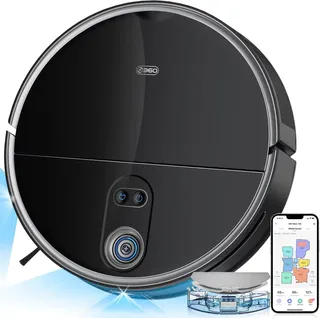
Suction
2,700 Pa
Battery
120 min
Navigation
Spinning Lidar
Mopping
1 Fixed Pad
Full Specifications
| Suction Power | 2,700 Pa |
| Battery Life | 120 min |
| Dustbin Capacity | 360 ml |
| Navigation | Spinning Lidar |
| Robot Height | 3.7" |
| Threshold Climbing | 20 mm |
| Brush Roll | Single |
| Mopping | 1 Fixed Pad |
| Self-Empty Dock | No |
| Obstacle Avoidance | No |
| Multi-Floor Maps | Yes |
| No-Go Zones | Yes |
| Carpet Boost | Yes |
| HEPA Filter | Yes |
| WiFi | 2.4 GHz |
| Voice Assistants | Alexa |
| Warranty | 1 year |
Compare with similar models:
The Bottom Line
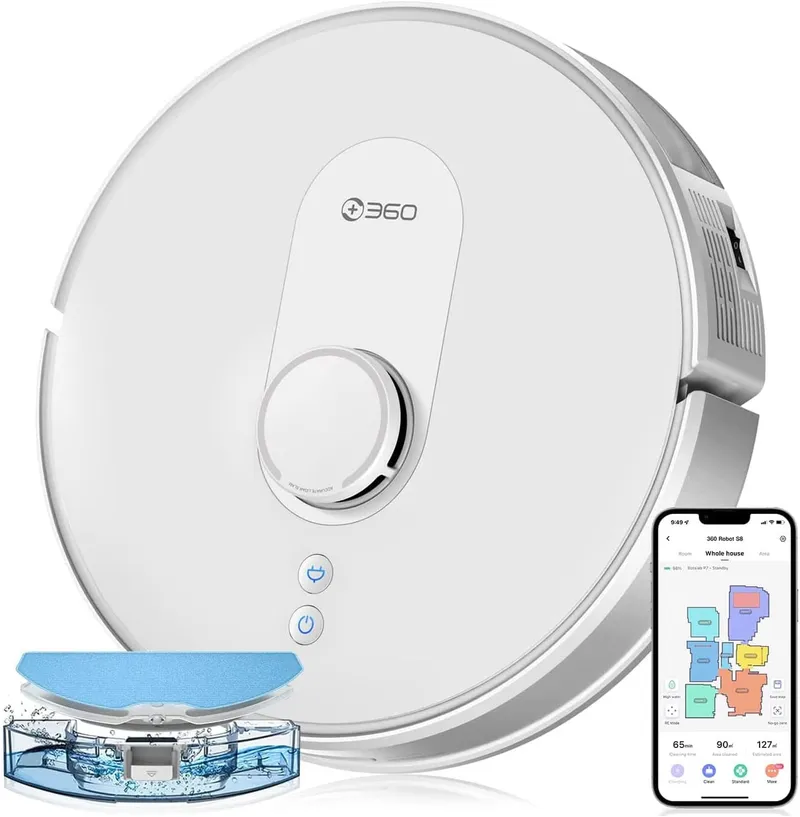
Here’s what makes the 360 S8 interesting: it packs LiDAR navigation, solid 2,700 Pa suction, and a built-in mopping system into a package that regularly sells for under $250. That’s flagship-level mapping technology at a budget price point. The catch? You’ll need to empty the dustbin yourself and pick up cables before each run since there’s no obstacle-recognition camera.
Quick Specs
- Released: October 2021
- Current Price: $200-$300 (originally $379)
- Suction: 2,700 Pa maximum
- Runtime: Up to 120 minutes
- Dustbin: 360 mL
- Water Tank: 320 mL
- Height: 3.74 inches (95 mm)
- Warranty: 1 year
What’s Good
The S8’s LiDAR navigation is genuinely impressive for its price. It maps rooms quickly, cleans in efficient straight lines rather than random patterns, and remembers up to 10 different floor plans for multi-story homes. Watch it work and you’ll see it outline each room’s perimeter first, then fill in with neat back-and-forth rows. Users consistently report that nothing gets missed.
Suction power sits at 2,700 Pa on the maximum setting, which handles pet hair, dust, and everyday debris without breaking a sweat. The vacuum offers four power levels (Quiet, Standard, Powerful, and Max), and there’s an automatic carpet boost that kicks in when it detects rugs.
The app deserves mention too. You can draw virtual no-go zones, schedule room-specific cleanings, adjust water flow for mopping, and even view a 3D map of your home. It integrates with Alexa and Google Assistant for voice commands. The interface feels polished rather than thrown together, which isn’t always the case with budget robot vacuums.
What’s Not So Good
That 360 mL dustbin fills up fast if you have pets or lots of foot traffic. Plan on emptying it after every full-house clean. And there’s no sensor to warn when it’s full, so you’ll need to check manually.
Without a front-facing camera, the S8 can’t recognize small obstacles. Cables, socks, and pet toys are fair game for tangling. You’ll want to “robot-proof” your floors before each run. This also means it won’t avoid pet accidents, something pricier models with AI cameras can do.
The mopping system works but remains basic. It drags a damp microfiber cloth behind the vacuum, which handles light dust and footprints but won’t scrub dried spills. More importantly, the S8 can’t tell the difference between hard floors and carpet when mopping. You’ll need to set up no-mop zones for any rugs, or remove them before a mopping run.
Carpet boost sometimes kicks in late. A few users have noticed the suction doesn’t always increase until the robot is already leaving the carpet, meaning the first pass on a rug might not get maximum power.
Black floors and dark rugs can trigger the cliff sensors, causing the S8 to avoid them entirely. The infrared sensors mistake dark surfaces for drop-offs. There’s no software fix for this, just a hardware limitation common to many robot vacuums.
Navigation and Mapping
The S8 uses dToF LiDAR (Direct Time-of-Flight laser), the same technology found in much more expensive robots. A spinning turret on top continuously scans the room, building a detailed map that appears in your app.
First-run mapping takes one full cleaning cycle. After that, the robot knows your home’s layout and cleans efficiently every time. It stores up to 10 maps, so you can use it on multiple floors by simply carrying it upstairs and selecting the appropriate map in the app.
The navigation handles complex layouts well. It figures out how to move between rooms through doorways, circles around furniture legs, and returns to its dock without getting lost. The LiDAR works in complete darkness too.
A spring-loaded mechanism on the LiDAR turret prevents the robot from getting wedged under furniture. If it tries to squeeze somewhere too low, the turret depresses and triggers a reverse. This thoughtful design touch prevents the kind of stuck-robot situations that plague some competitors.
You can toggle “anti-collision mode” in the app. With it on, the S8 maintains a small gap from obstacles and barely touches them. Turn it off, and it’ll push through light obstacles like curtain hems to clean behind them.
Cleaning Performance
On hard floors, the S8 excels. Dust, crumbs, pet hair, and larger debris all get swept up efficiently. The single side brush reaches into edges and corners better than expected, actually outperforming some competitors in corner cleaning tests.
On low to medium carpet, results are good. The automatic carpet boost engages (usually), ramping suction to maximum. Most visible dirt and hair get picked up. On medium-pile carpet, tests showed only a small amount of embedded hair remaining after cleaning.
High-pile or shag carpet is not recommended. The manufacturer explicitly advises against using it on thick carpets, and the S8’s moderate suction and fixed-height brush won’t provide meaningful deep cleaning on plush surfaces.
For pet hair on hard floors, pickup is excellent. On carpets, performance is solid but not perfect. Long pet hair may remain slightly embedded in carpet fibers. The bristle brush will collect hair (requiring periodic cleaning with the included cutting tool), but the trade-off is floors that stay noticeably cleaner.
Mopping
The 320 mL water tank is larger than average, enough to mop around 100 square meters before needing a refill. Water flow adjusts across three levels through the app, letting you go lighter on hardwood floors and heavier on tile.
The mopping itself is serviceable for maintenance cleaning. It picks up fine dust and leaves floors looking fresher. But since there’s no vibrating or spinning mechanism, just a cloth dragging behind the robot, stuck-on grime will remain. The mop pad attaches via velcro pockets and needs manual washing after each use.
The significant limitation: no automatic carpet detection for mopping. If you don’t set up no-mop zones or physically remove rugs, the S8 will happily drag its wet cloth right across your carpet. It can even get stuck climbing onto a rug with the mop attached. This requires some forethought on the user’s part.
Battery and Runtime
The 3,200 mAh battery provides around 120 minutes on Quiet or Standard mode, dropping to roughly 60-80 minutes on Max. That’s enough to clean 1,000-1,300 square feet on a single charge under normal conditions.
For larger homes, the S8 automatically returns to its dock when the battery runs low, recharges to about 80%, then resumes exactly where it left off. You don’t need to do anything; it handles the whole process and eventually finishes your floor, even if it takes multiple charging cycles.
Full charging takes about 4-5 hours. The dock outputs 24W, which isn’t fast-charging territory but works fine for overnight or while you’re at work.
The App
The 360Robot app (iOS and Android) handles all the smart features. Setup is straightforward if you’re on a 2.4 GHz WiFi network, though a few users have reported connection issues (usually resolved by ensuring the phone isn’t on 5 GHz during pairing).
Once connected, you get:
- Interactive maps with room labels
- Virtual no-go zones and no-mop zones
- Room-specific scheduling
- Suction and water level controls
- Cleaning history and statistics
- Manual directional control
- A 3D map view (more of a novelty, but it looks cool)
The interface is intuitive. Commands register quickly, and the map updates in near-real-time during cleaning. One Android quirk: some users report an annoyingly persistent notification that won’t dismiss. Disabling app notifications solves it but isn’t ideal.
Voice assistant integration covers the basics. “Alexa, start the vacuum” works fine, but room-specific commands like “clean the kitchen” may not be supported depending on how the skill is configured.
The Dock
The included charging dock is a simple, compact unit measuring about 6 x 6 x 3.5 inches. It does one job: charge the robot. No automatic dirt emptying, no mop cleaning, nothing fancy.
Position it against a wall with about 3 feet of clearance in front and 1 foot on each side. The robot needs this space to maneuver in and out. Place it on hard floor, not carpet, and keep it out of direct sunlight (which can interfere with the docking sensors).
A clever design touch: the cord management slot on the back lets you tuck away excess cable length.
If you want automatic dirt disposal, the S8 Plus variant comes with an auto-empty dock and a larger 5,000 mAh battery. The standard S8 can’t be upgraded later since 360 doesn’t sell the auto-empty dock separately.
What’s in the Box
- 360 S8 robot vacuum with dustbin and filter pre-installed
- Charging dock
- Power adapter with interchangeable plug heads (US, EU, UK)
- Combined dustbin/water tank module
- Mop bracket
- 1 microfiber mop pad
- 2 side brushes (one pre-installed, one spare)
- Cleaning tool with brush and blade
- User manual
Worth noting: no extra filters and only one mop pad. You’ll want to order replacements within a few months.
Maintenance
The S8 is easy to maintain. All the pieces that need regular attention are accessible without tools.
After each use, empty the dustbin and check the brush for hair wraps. If you mopped, remove and rinse the mop pad.
Weekly, tap or brush dust off the filter. Check the side brush for tangled threads.
Monthly, rinse the filter under water and let it dry completely (24 hours minimum). Clean the cliff sensors with a dry cloth. Check the front caster wheel for hair wrapped around its axle.
Every 3-6 months, replace the filter. Filters cost about $2-5 each in multi-packs.
Every 6-12 months, replace the main brush and side brush as needed. Kits with multiple replacement parts run $15-25.
Third-party replacement parts are widely available and compatible. You’re not locked into expensive OEM supplies. Annual maintenance costs typically stay under $30-40 even with regular part replacements.
Pet Considerations
For pet owners, the S8 makes a real difference in keeping fur under control. Daily runs prevent hair from accumulating, and the vacuum handles both short and long pet hair effectively on hard floors.
On carpets, results are good but not perfect. Some long pet hair will remain embedded in carpet fibers, though the visible tumbleweeds and loose fur get picked up. The bristle brush collects hair (you’ll need to clean it every few days with heavy shedders), but that means the hair is off your floor and concentrated in one place.
The critical limitation: no pet waste avoidance. The S8 has no camera to recognize accidents, and if your pet has an indoor mishap, the robot will run right through it. Many pet owners schedule runs only when they’re home to intervene if needed, or do a quick floor check before starting.
Pet food and litter scatter get vacuumed up without issue on hard floors. Consider placing no-go zones around water bowls to prevent bumping and spills.
Noise Levels
The S8 runs at about 59 dB in Quiet mode and up to 70 dB at maximum suction. For reference, 60 dB is roughly normal conversation volume, while 70 dB is more like a dishwasher.
Quiet mode works for cleaning while someone naps in another room. Maximum power is noticeably louder but not ear-splitting. Most users run Standard mode, which falls somewhere in between.
The app includes a Do Not Disturb schedule to silence voice prompts during specific hours. You can also adjust the voice volume or mute it entirely if the robot’s cheerful announcements (“Cleaning makes me happy!”) get old.
Who Should Buy This
The 360 S8 makes sense if you want smart navigation and mapping without the premium price tag. It’s a good fit for:
- Multi-room homes where efficient navigation matters
- Pet owners willing to do a quick floor check before runs
- People who want both vacuuming and light mopping
- Those comfortable with app-based control
- Budget-conscious buyers who still want LiDAR accuracy
It’s not the right choice if you:
- Have mostly high-pile carpet
- Need hands-off operation (consider models with auto-empty docks)
- Have floors typically cluttered with cables and small objects
- Want a robot that can avoid pet accidents
- Prefer a well-known brand with local retail support
The Competition
At its typical $200-300 price point, the S8 competes with:
The Roborock Q5 (~$350) has similar 2,700 Pa suction and LiDAR mapping but no mopping and a higher price. Roborock has a more polished app and wider brand recognition.
The Dreame D9 (~$300) has comparable specs with slightly higher suction (3,000 Pa) and a larger dustbin (570 mL). Similar mopping capability. If you’re already in the Xiaomi ecosystem, this integrates with Mi Home.
The iRobot Roomba i3 (~$250) has a strong brand and excellent customer support, but no smart mapping, no no-go zones, and no mopping. The S8 offers significantly more features.
The S8 sits in a sweet spot where it matches or beats similarly priced competitors on most specs while costing less than many alternatives.
Known Issues
A handful of documented quirks worth knowing:
- Android notification persistence: the app sometimes creates a notification that won’t dismiss. Disabling notifications works around it.
- WiFi setup errors: some users encounter “Error 6003” during initial pairing. Ensuring you’re on 2.4 GHz (not 5 GHz) usually resolves it.
- App confusion: both “360Robot” and “Botslab” apps exist. Use the 360Robot app for global versions.
- Carpet boost delay: the suction increase sometimes lags when transitioning to carpet.
- Dark floor avoidance: the cliff sensors treat very dark surfaces as drops.
None of these are deal-breakers, but they’re good to know before purchasing.
Final Verdict
The 360 S8 delivers on its core promise: LiDAR navigation and systematic cleaning at a budget price. It won’t match a $1,000 robot vacuum in every way, but for routine floor maintenance with the occasional mopping, it handles the job reliably.
The trade-offs are clear. You’ll empty the dustbin yourself. You’ll need to prepare floors before each run. The mopping is basic. But if those concessions don’t bother you, the S8 is excellent value.
For homes with hard floors and low-to-medium carpeting, occupied by people willing to do minimal prep work, the 360 S8 earns a solid recommendation. It’s proof that capable robot vacuums don’t have to cost a fortune.