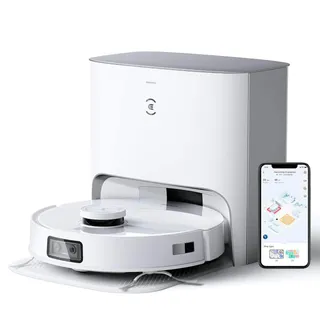
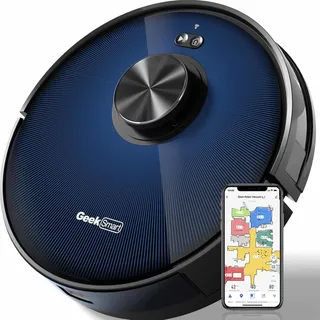
Suction
2,650 Pa
Battery
180 min
Navigation
Spinning Lidar
Mopping
1 Fixed Pad
Full Specifications
| Suction Power | 2,650 Pa |
| Battery Life | 180 min |
| Dustbin Capacity | 420 ml |
| Navigation | Spinning Lidar |
| Robot Height | 3.9" |
| Threshold Climbing | 20 mm |
| Brush Roll | Single |
| Mopping | 1 Fixed Pad |
| Self-Empty Dock | No |
| Obstacle Avoidance | Yes |
| Multi-Floor Maps | Yes |
| No-Go Zones | Yes |
| Carpet Boost | Yes |
| HEPA Filter | Yes |
| WiFi | 2.4 GHz |
| Voice Assistants | Alexa |
| Warranty | 1 year |
Compare with similar models:
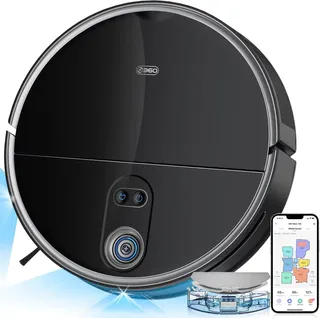
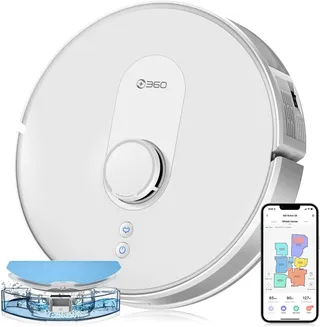
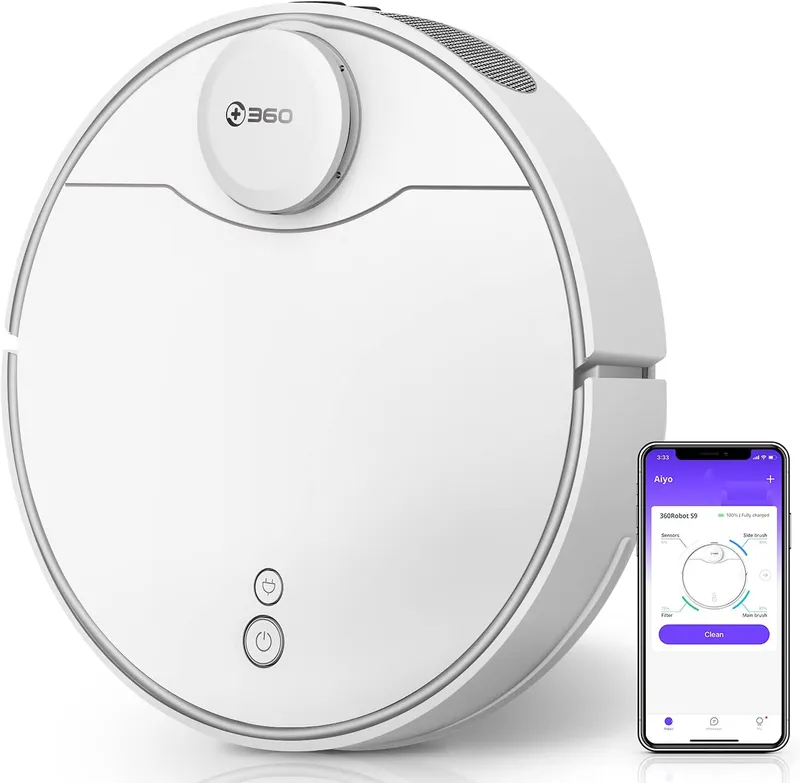
360 S9 Robot Vacuum
The 360 S9 landed as the company’s flagship robot vacuum in early 2020, and it’s still a solid option for anyone wanting premium features without the premium price tag. While regional stock has become spottier as the model ages, you can still find it through official channels and third-party sellers, often at significant discounts from its original $400 launch price.
What makes the S9 worth considering? It has LiDAR navigation, simultaneous vacuuming and mopping, multi-floor mapping, and app control in a package that frequently sells for $250-300. Just watch where you buy: gray-market deals on Walmart Marketplace have dropped as low as $119, but those units may lack warranty coverage. Stick with authorized sellers like “360 Smart Life” on Amazon to ensure you’re protected.
Hardware Specifications
Suction and Cleaning System
The S9 delivers approximately 2,200-2,650 Pa of suction power. Official specs list 2,200 Pa, while marketing materials tout 2,650 Pa as the peak output in Max mode. Either way, it handles dust and crumbs on hard floors with ease and performs respectably on carpets, particularly when you kick it into high gear.
The robot uses a single main brush with a spiral design combining bristles and rubber fins. At roughly 6-7 inches wide, it agitates carpets effectively while sweeping debris into the suction inlet. The brush is spring-loaded and pops out via two clips for cleaning. 360 markets this as an “anti-entanglement” system, and while long hair will still wrap around the brush ends, it’s no worse than comparable vacuums.
A single three-arm side brush handles edge duty, sweeping debris from corners into the vacuum’s path. The box includes a spare, so you’re set for a while before needing replacements.
The 420 mL dustbin sits on the smaller side. In an average home running once or twice weekly, expect to empty it after every run or two, especially if you have pets. Some early retailer listings incorrectly showed 1,000 mL, but that’s simply wrong. The actual bin holds less than half that.
Navigation and Sensors
Here’s where the S9 outperforms its price class. The spinning LiDAR turret creates accurate floor maps through laser distance measurements, enabling systematic cleaning in efficient straight-line patterns rather than the random bouncing you’d see from cheaper robots. The 360 Autopilot System 5.0 combines this with SLAM algorithms for precise mapping that independent tests have validated.
What sets the S9 apart is its ultrasonic sensor on the front bumper, working alongside the LiDAR. This “dual-eye” system helps detect transparent or low objects that laser alone might miss. You’ll notice the robot slowing down near obstacles like cups or pet bowls, gently nudging rather than ramming. In one test, it approached a glass slowly and barely pushed it without tipping.
That said, the S9 cannot identify specific objects. There’s no AI camera here, no recognition of pet waste or socks. It treats unknown small objects as obstacles only when it physically encounters them, which means it might drag a sock or cable before realizing something’s caught.
The full sensor suite includes 25 sensors: the LiDAR, ultrasonic module, bump sensors, cliff sensors (preventing falls), wall-follow sensors, and likely an accelerometer and gyro for odometry. A carpet sensor triggers the automatic boost when transitioning to rugs.
Battery and Power
The 5,200 mAh lithium-ion battery delivers up to three hours of runtime on standard mode, covering roughly 3,200 square feet under ideal conditions. Real-world testing confirms this: one reviewer cleaned 600 square feet in under 30 minutes with plenty of charge remaining. Using Max suction or making multiple passes will reduce runtime, but even at full power, expect over two hours.
When the battery runs low, the S9 returns to its dock, recharges in about four hours, then picks up exactly where it left off. For most apartments and medium-sized homes, a single charge handles everything. Larger homes might trigger a mid-job recharge, but the robot manages this automatically.
Physical Design
At 13.8 inches in diameter and 3.9 inches tall, the S9 is slightly larger than some competitors but still fits under most furniture with 4+ inches of clearance. The LiDAR turret accounts for that height, so measure carefully before assuming it’ll squeeze under low couches.
The robot handles thresholds up to 20mm (about 3/4 inch), which covers standard door transitions and most area rug edges without issue. Anything taller might cause it to retreat or get stuck.
Build quality impressed multiple reviewers, who noted solid construction and well-designed accessories. The white finish blends into most homes, and the unit feels substantial without being heavy at roughly 8.6 pounds.
Filtration
The S9 uses a high-efficiency HEPA-class filter that captures fine particles like flour and sugar well. It’s washable, and 360 includes a spare in the box. One review noted the filter maintained about 95% efficiency after a year of regular use with proper cleaning. Just tap out the dust after each run and rinse occasionally, letting it dry completely before reusing.
Noise Levels
Noise is one of the S9’s strengths. Running at roughly 55 dB in quiet mode and 65 dB at maximum, it’s noticeably quieter than many competitors. One reviewer called it “the quietest vacuum of all the models I’ve tried.” You can comfortably run it while watching TV or during the day without disturbing anyone. The Do Not Disturb feature mutes voice prompts and prevents cleaning during set hours, making nighttime operation practical. Even pets seem less bothered compared to louder alternatives.
Mopping Capabilities
The S9 is a 2-in-1 vacuum and mop with a drag-style system and an electronically controlled water pump. You attach the 200 mL water tank and microfiber pad to the bottom, and it distributes water at three adjustable levels while vacuuming.
There’s no vibrating or rotating mechanism here. The pad relies on the robot’s movement to clean, with only the unit’s 8.6-pound weight providing pressure. Despite this simplicity, tests found it removed a surprising amount of grime, leaving floors visibly cleaner without soaking them. It’s best for routine maintenance rather than tackling dried spills or stubborn stains.
Two washable microfiber pads come in the box. They’re easy to attach and remove without flipping the robot, and they’re machine washable.
The 200 mL tank covers a moderate area. Using the low water setting, you could mop around 1,600 square feet. Larger spaces or higher water settings may require a mid-job refill.
Carpet Handling During Mopping
The S9 lacks automatic mop lifting, which is important to understand. The mop pad stays fixed, so without intervention, it would drag across carpets. The solution is software-based: you designate no-mop zones in the app for carpeted areas. The robot avoids those zones when the mop is attached, effectively keeping carpets dry. This works reliably, but it does require setup on your part.
Software and App Features
Mapping and Navigation
The 360Robot app (iOS and Android) provides detailed floor maps built in real-time as the robot cleans. You can see its progress live, and the map updates automatically if furniture moves. The app segments rooms automatically or lets you edit them manually.
Multi-floor support is generous: the S9 stores up to 10 maps, far more than most competitors’ 3-5 map limit. For multi-story homes, carry the robot upstairs and it will recognize it’s on a new floor, prompting you to map it. Each floor gets its own saved no-go zones and settings.
Map editing is robust. Name rooms, merge or split them, draw virtual boundaries, and set both no-go zones (complete avoidance) and no-mop zones (avoidance only when mopping). The interface rivals top brands for functionality.
Cleaning Modes and Customization
The S9 offers considerable flexibility:
- Auto mode cleans the entire mapped area
- Room cleaning targets specific rooms you select
- Zone cleaning lets you draw rectangles for focused attention
- Spot cleaning spirals around a specific location
- Edge mode traces walls for baseboard cleaning
- Manual control via app joystick or the included RF remote
Four suction levels (Quiet, Standard, Powerful, Max) let you balance cleaning power against noise and battery life. Carpet Boost automatically increases suction on rugs if enabled. Three water flow levels control mopping intensity.
You can schedule cleanings by room with different settings for each, effectively creating custom routines. The app even supports deep cleaning mode, which makes double passes over selected areas.
The Remote Control Advantage
Unlike most competitors, the S9 includes a dedicated RF remote control. This lets anyone in the household start cleaning, send the robot home, or do spot cleaning without touching a phone. The remote works through walls and includes a boost mode toggle. Reviewers who prefer tactile controls found this invaluable.
Smart Home Integration
The S9 works with Amazon Alexa and Google Assistant for basic voice commands: start, stop, and dock. You can’t specify rooms via voice, and the command set is limited, but hands-free start and stop works well. There’s no Apple HomeKit, Matter, or IFTTT support.
App Quality
App ratings hover around 3.6/5 on iOS and 4.1/5 on Android. Users praise the detailed mapping, scheduling flexibility, and intuitive interface. One reviewer called it “my favorite of all robot vacuum apps” for its straightforward layout.
Common complaints include Wi-Fi setup difficulties (remember: 2.4GHz only), occasional server hiccups, and the required account creation. Initial language settings can confuse some users, as the robot may speak Chinese out of the box before region settings are configured. Once past setup, day-to-day connectivity is generally stable.
Dock and Charging Station
The included dock is a simple charging base without auto-empty or mop-washing capabilities. It’s compact with a clever hidden cord wrap in the back that keeps your setup tidy.
Allow about 18 inches of side clearance and 5 feet in front of the dock for the robot to navigate properly. Place it against a wall on a hard, level surface away from direct sunlight, which can interfere with the IR docking sensors.
Maintenance is minimal: occasionally wipe the charging contacts and keep the IR transmitter dust-free.
Included Accessories
The 360 S9 ships with a generous package:
- Robot vacuum with pre-installed dustbin and main brush
- Charging dock with power cord and hidden cord wrap
- RF remote control with batteries
- 200 mL water tank
- 2 side brushes (1 installed, 1 spare)
- 2 HEPA filters (1 installed, 1 spare)
- 2 washable microfiber mop pads
- Mop bracket
- Multi-purpose cleaning tool
- User manual
This generosity with spare consumables reduces your first-year maintenance costs.
Replacement Parts and Ongoing Costs
Filters run about $10-20 for a two-pack. Replace every 3-6 months depending on use.
The main brush is around $15. Replace every 6-12 months as bristles wear.
Side brushes are roughly $5 each. Replace every 3-6 months if heavily used.
Mop pads cost about $15 for a two-pack, but the washable pads last many months with proper care.
A replacement battery runs $40-60 from third parties. Expect to replace after 2-3 years if runtime noticeably drops.
Official parts are available through 360’s website and authorized resellers. Third-party compatible kits on Amazon work fine and cost less, though quality can vary. Budget roughly $30-50 annually for consumables after the first year.
Maintenance
The S9 keeps maintenance straightforward:
- Main brush: tool-free removal via two spring-loaded locks. Clean weekly to remove hair tangles.
- Dustbin: easy access under the top lid. Empty after each full-house clean, especially with pets.
- Water tank: remove, flip open the stopper, fill. Empty remaining water after mopping to prevent mold.
- Mop pads: machine or hand wash after each use. Air dry.
- Sensors: wipe the cliff sensors, LiDAR cover, and charging contacts monthly with a dry cloth.
A quick 5-minute post-cleaning routine keeps the S9 performing optimally.
Cleaning Performance
Hard Floors
The S9 excels here, scoring 99% debris removal on hardwood in testing. Dust, grit, and hair disappear reliably, and the mopping leaves floors noticeably cleaner. The soft wheels won’t scratch wood.
Carpet Performance
On low and medium-pile carpet, the S9 is effective but not exceptional. Testing showed around 88% debris pickup in a single pass. Fine particles like sugar or cat litter can settle into fibers and escape the first sweep. Enabling Max mode and using the deep-clean option significantly improves results.
High-pile and shag carpets challenge this robot. It may struggle to move effectively or clean deep into thick fibers. If your home is mostly high-pile carpet, consider a model specifically designed for deep carpet cleaning.
Pet Hair
Owners with dogs and cats report strong performance. The S9 collects pet hair tumbleweeds on hard floors completely, and it removes hair from carpet surfaces well, especially with Carpet Boost enabled. Long pet hair will wrap around the brush, requiring regular cleaning, but that’s true of any robot vacuum.
Edge and Corner Cleaning
The single side brush sweeps debris from along walls effectively, reaching 2-3 inches past the robot’s body. An edge-cleaning mode traces all perimeter walls if desired.
Corners present the usual limitation of round robots: the S9 can’t reach the very tip of 90-degree angles. It comes close, and often sweeps debris out far enough to vacuum, but you might occasionally find a tiny triangle of dust in sharp corners.
Navigation and Obstacle Handling
Cleaning Patterns
The S9 cleans methodically in overlapping straight lines, dividing rooms into sections and covering them efficiently. After the initial mapping run, it knows where it’s been and doesn’t waste battery re-cleaning areas. A 600-square-foot space cleaned in under 30 minutes in testing.
LiDAR navigation works in complete darkness since it’s an active laser system. Run it overnight with lights off and it performs identically.
Obstacle Handling
Furniture legs get detected and circled, with the ultrasonic sensor ensuring gentle approaches rather than hard bumps. Thresholds up to 3/4 inch are no problem.
The S9 cannot detect electrical cords, socks, or small toys. It will drive over cables and potentially tangle them in the brush. It may push lightweight items like slippers before recognizing them as obstacles. Pet bowls get approached cautiously but might still slide if bumped.
This isn’t unusual for robots in this price range, but it does mean you need to do some basic floor prep before cleaning. Pick up cables, clothes, and small items. If you have areas with permanent cord clutter, draw no-go zones around them in the app.
Getting Stuck
In a properly prepared home, the S9 rarely gets stuck. Common stuck situations include squeezing under furniture with barely enough clearance (where the LiDAR turret brushes the bottom), getting hung up on thick thresholds, or tangling in cords or fabric.
When stuck, the robot announces the problem and stops. The app shows where it happened. Good mapping prevents repeated incidents since you can add no-go zones for problem areas.
Black Floors and Dark Rugs
A known limitation: the infrared cliff sensors may interpret very dark surfaces as drop-offs. If you have black rugs or dark navy floors, the robot might refuse to cross them, thinking it’s about to fall off an edge. There’s no software toggle to disable this safety feature. Workarounds include placing white tape strips on rug edges to give the sensor something to detect, or simply marking those areas as no-go zones.
Pet Considerations
The S9 handles pet hair effectively and runs quietly enough that many pets tolerate it without stress. The 55 dB quiet mode is gentler than most vacuums, and many dogs and cats simply watch or keep their distance rather than panicking.
Cat litter scattered outside the box gets vacuumed thoroughly on hard floors. The filter helps reduce pet dander and allergens.
One important warning: the S9 cannot detect pet accidents. If your pet has a mishap on the floor and the robot encounters it, you’ll have the classic “poopocalypse” scenario, with feces smeared across floors and tracked by wheels. If you have a puppy or elderly pet with occasional accidents, don’t run the robot unsupervised. Clean up any accidents first.
Home Compatibility
Home Size
The S9 suits small apartments to large homes up to 3,000+ square feet. Single-battery coverage reaches roughly 2,000-2,500 square feet depending on settings. Larger single-floor areas trigger automatic recharge and resume. Multi-story homes work fine with manual relocation between floors and the 10-map storage.
Furniture Clearance
Anything under 4 inches won’t fit underneath. Measure your sofas and beds. If clearance is exactly 4 inches, the LiDAR turret might graze the bottom and cause it to wedge.
Layout Complexity
Complex multi-room layouts, long hallways, and irregular floor plans all work well thanks to LiDAR mapping. The robot methodically covers each room, remembers doorways and transitions, and doesn’t get confused by mazes of furniture.
Preparation Required
The S9 navigates around chairs and tables reasonably well but cannot magically avoid cables, toys, or clothing. A baseline level of tidying before each run keeps things smooth. If your floors are perpetually cluttered with small hazards, consider a model with AI object avoidance.
Value and Competition
Who Should Buy the 360 S9
- Budget-conscious buyers wanting premium features: LiDAR mapping, multi-floor support, app control, and mopping at mid-range prices
- Homes with mixed flooring, since it’s effective on both hard floors and low/medium-pile carpets
- Larger homes on a budget, where the long battery life and multi-map memory suit spacious multi-room layouts
- Pet owners, since it’s quiet yet powerful and keeps pet hair under control (assuming house-trained pets)
- Multi-level homes, where the generous 10-map storage beats most competitors’ 3-4 map limits
- Anyone comfortable with light preparation who doesn’t mind picking up floor clutter and emptying the bin
Who Should Consider Alternatives
- Hands-off users wanting auto-empty, since the S9 requires manual bin emptying
- Extremely cluttered homes, because no AI object recognition means more prep work
- Homes with frequent pet accidents, since the S9 can’t detect or avoid waste
- High-pile carpet homes, as it’s not optimized for deep pile cleaning
- Those wanting robust local support, since 360’s service network is less established than iRobot’s
Competitive Position
At $250-300, the S9 competes favorably against robots costing $400-500. You get LiDAR accuracy, multi-floor mapping, electronic water control for mopping, and strong suction. The trade-offs: no auto-empty, no AI obstacle avoidance, and basic mopping compared to vibrating or lifting mop systems on pricier models.
If core cleaning performance matters more than convenience features, the S9 delivers excellent value.
Known Issues
No product is perfect. Here’s what owners have encountered:
Wi-Fi setup can trip people up initially, usually due to 5GHz interference. The S9 requires 2.4GHz networks. A reset typically resolves connection issues.
There are occasional reports of maps disappearing after firmware updates or complete battery drain. Not widespread, but worth knowing.
Cliff sensors may refuse to cross very dark floors or rugs, interpreting them as drop-offs.
Cloud-dependent features mean occasional server hiccups or delays. Once connected, stability is generally good.
Rare isolated cases of issues post-firmware update have been reported. Most updates install without problems.
Overall user reviews average around 4/5 stars, with criticisms focused on setup quirks rather than fundamental flaws. No major recalls or widespread defects have emerged since 2020.
Limitations
To set proper expectations, here’s what the 360 S9 cannot do:
- Cannot identify or avoid small hazards like pet waste, cables, or socks
- No automatic dirt disposal; requires manual bin emptying
- No automatic mop lifting; carpets need no-mop zones or separate runs
- Not a deep carpet cleaner; struggles with high-pile rugs
- Cannot vacuum wet spills or function as a wet-dry vac
- Indoor use only on finished floors
- Cloud-dependent for smart features
- No HomeKit, Matter, or SmartThings integration
- No camera for remote monitoring
These limitations are typical for the price class. The S9 excels at core vacuum and mop duties in a reasonably prepared environment. Understanding these trade-offs helps ensure the robot meets your expectations.
Warranty and Support
360 Smart Life provides a 12-month warranty covering manufacturing defects. Coverage applies to the robot and included accessories when purchased from authorized sellers.
Support channels include the app, email (support@360botslab.com), and regional phone lines. Response times typically run 24-48 hours. User communities on Reddit and Facebook offer additional troubleshooting help.
Warranty claims through Amazon purchases are generally straightforward. Direct claims to 360 may require shipping to their service center. The company has been responsive in sending replacement parts for verified defects.