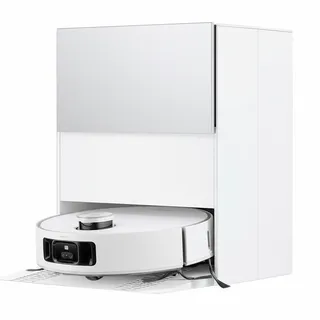
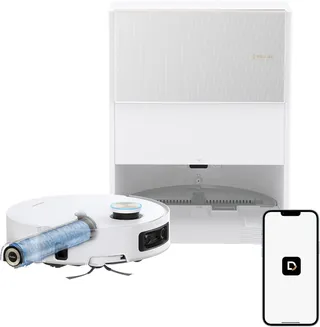
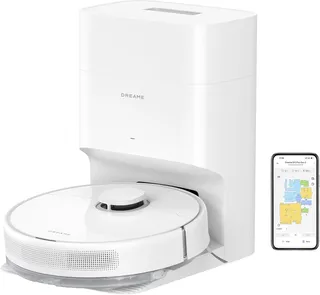
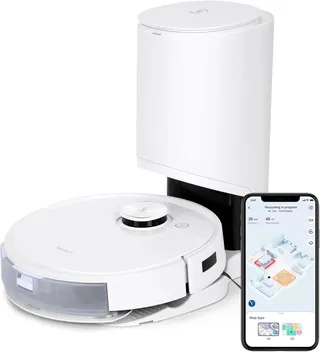
Dreame L10s Ultra Gen 2
- mopping self empty mop washing mop drying lidar obstacle avoidance no go zones multi floor carpet boost
Released 2024
Suction
10,000 Pa
Battery
200 min
Navigation
dToF LiDAR
Mopping
2 Spinning Pads
Full Specifications
| Suction Power | 10,000 Pa |
| Battery Life | 200 min |
| Dustbin Capacity | 300 ml |
| Navigation | dToF LiDAR |
| Robot Height | 3.8" |
| Threshold Climbing | 20 mm |
| Brush Roll | Single Floating All-Rubber |
| Mopping | 2 Spinning Pads |
| Mop Raising Height | 10.5 mm |
| Self-Empty Dock | Bagged |
| Dock Bag Capacity | 3.2 L |
| Mop Washing | Yes |
| Mop Drying | Yes |
| Obstacle Avoidance | Yes |
| Multi-Floor Maps | Yes |
| No-Go Zones | Yes |
| Carpet Boost | Yes |
| HEPA Filter | Yes |
| WiFi | 2.4 GHz |
| Voice Assistants | Alexa |
| Warranty | 1 year |
Compare with similar models:
The Sweet Spot in Robot Vacuums
The Dreame L10s Ultra Gen 2 occupies an interesting position in the robot vacuum market. Released in late 2024, it packs flagship-level features at a price that’s dropped significantly from its original $799 MSRP to around $500 on sale. For buyers who want serious cleaning performance without paying $1,000+, this might be the most compelling option available right now.
What makes it stand out? Strong 10,000 Pa suction (double the previous generation), dual spinning mops that actually scrub, a base station that handles almost everything automatically, and stable firmware that just works. It’s not chasing every bleeding-edge feature—there’s no AI camera for obstacle identification, for instance—but what it does, it does reliably.
Physical Design and Dimensions
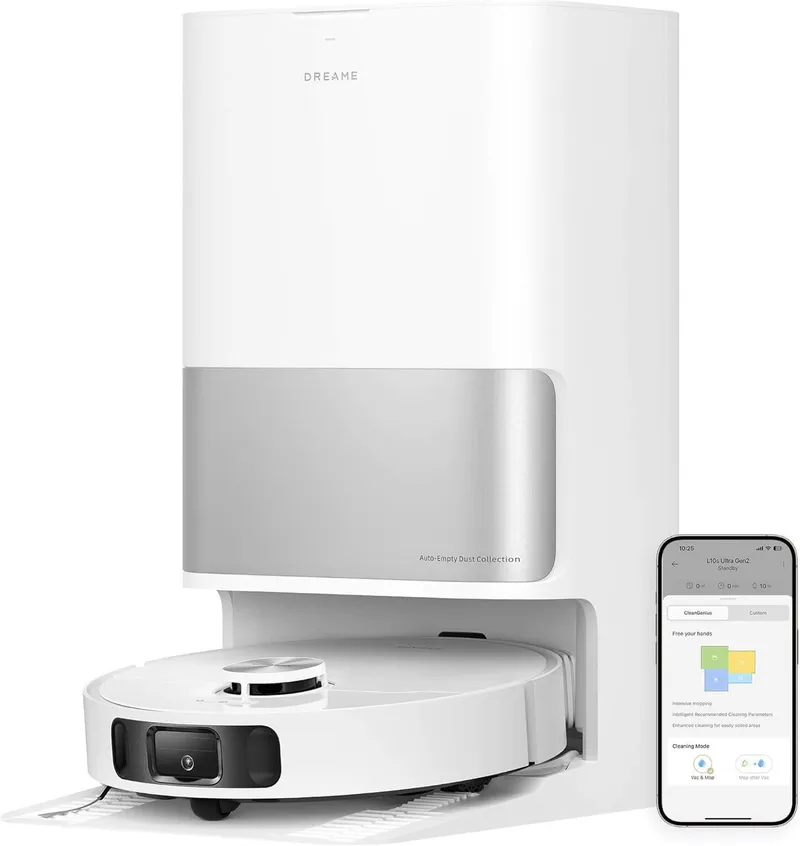
The robot measures 350 x 350 x 97 mm (about 13.8 inches in diameter and 3.8 inches tall), weighing around 4 kg (8.8 lbs). That’s a standard circular form factor that fits under most furniture with 10 cm or more clearance.
The base station is where things get bulky. At roughly 45.7 x 34.0 x 59.0 cm tall and 8.5 kg, it’s about the size of a laundry hamper. You’re trading floor space for automation here—the dock handles dust emptying, mop washing, mop drying, water refilling, and detergent dispensing. Plan to give it about 1.5 feet on each side and 4 feet in front for the robot to dock easily.
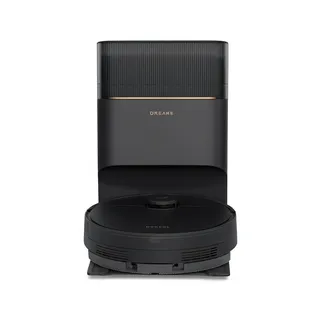
Color options are limited: white only, with a glossy finish and silver accents on the base. If you need black, you’ll have to look at the similar L10s Pro Ultra Heat instead.
The model number is RLL32SE globally, with no significant hardware differences between regions. Don’t confuse it with the first-generation L10s Ultra from 2022—that one had 5,300 Pa suction and couldn’t lift its mop pads.
Where to Buy
Authorized retailers include Dreame’s official store, Amazon (where it’s an “Amazon’s Choice” item), Best Buy, and Walmart. In Europe, you’ll find it at retailers like Galaxus and Digitec.
Stick with authorized channels if you can. Dreame provides a 1-year standard warranty, and gray-market sellers (random Amazon Marketplace vendors, eBay imports) won’t offer the same coverage. Extended warranties are available for an additional cost if you want longer protection.
Suction and Vacuuming Performance
The 10,000 Pa maximum suction comes from Dreame’s “Vormax” high-speed motor—a significant jump from the previous generation’s 5,300 Pa. In practical terms, this places it among the top-tier consumer robot vacuums.
Independent testing shows strong results: roughly 95% pickup of fine debris (kitty litter) on both hard floors and carpet. The automatic carpet boost kicks in when ultrasonic sensors detect carpet, ramping up suction without any intervention.
The onboard dustbin holds 300 mL of debris (some retailer listings incorrectly show 470 mL). That’s on the small side, but it doesn’t matter much since the base empties it automatically after each run. The bin includes a HEPA filter that should be replaced every few months—replacements run about $5-10 each.
The Brushroll System
The main brush is a single floating, all-rubber design with no bristles. The rubber fins and floating suspension help it maintain contact on uneven floors while significantly reducing hair tangles compared to traditional bristle brushes.
Long hairs can still wrap around it, but far less than you’d expect. If you want even better performance, Dreame sells an optional TriCut brush upgrade ($49.99) with a built-in hair-cutting blade that slices tangled hairs as the brush rotates. Users with pets report it virtually eliminates manual hair removal.
Maintenance is straightforward: the brush cover pops off, the brush pulls out, and the end caps detach for clearing any hair that reaches the bearings. No tools required.
The single right-side sweeping brush is a standard 3-armed nylon bristle type. Some users wish for two side brushes—one owner noted the single spinner occasionally flings a Cheerio out of reach—but edge cleaning is generally good, especially with the MopExtend feature handling edges during mopping.
Navigation and Obstacle Avoidance
The Gen 2 navigates using a dToF LiDAR sensor on top combined with an advanced 3D obstacle sensor on the front. Here’s where things get interesting: despite some early assumptions, this robot does NOT have an RGB camera. Instead, it uses an infrared structured-light sensor (likely a dual-line laser or IR depth sensor) for 3D obstacle detection.
What does this mean practically? The robot can perceive objects like chair legs, cables, and pet bowls, then navigate around them. But it won’t identify what those objects are—it just sees an obstacle shape. No “this is a sock” recognition, no photo-level object IDs in the app. For some users, this is actually a privacy advantage. No sensitive images getting uploaded to the cloud.
The 3D sensor works well in practice. Users report it handles pet bowls and table legs effectively, navigating around common floor clutter without major issues. Very small or low objects like cables can still cause problems if tangled in the brush, but the robot will attempt to avoid them.
LiDAR mapping is fast—a quick mapping run (without cleaning) takes only a few minutes for an entire floor. Maps are accurate to within about 2 cm. Multi-floor mapping supports up to 3 maps, and the robot can automatically add new rooms if it discovers them (like when a previously closed door is found open).
Navigation follows a methodical row-by-row pattern. Users praise the efficient pathfinding—no backtracking loops or random behavior. It handles complex layouts and tight spaces well, maneuvering under chair legs without much bumping.
Battery and Runtime
A 5,200 mAh lithium-ion battery provides approximately 180-200 minutes of runtime on hard floors at standard power—enough to cover around 200 square meters (2,100 sqft) per charge. Dreame claims up to 240 minutes in quiet mode, though real-world results tend toward the lower estimates.
On maximum suction, expect runtime to drop significantly to around 60-80 minutes. The robot supports auto-recharge and resume: when battery drops below about 20% mid-clean, it returns to base, recharges, then continues where it left off.
The Gen 2 introduced faster charging at roughly 3.5 hours for a full recharge (versus 5-6 hours on the previous generation). This comes from a higher output 40W charger. The dock can even schedule charging during off-peak hours to save on electricity costs.
Climbing and Clearance
The robot handles thresholds up to 20 mm (0.79 inches)—standard door thresholds, rug edges, and floor transitions are no problem. Testing shows it clears 14 mm thresholds easily; at 20 mm it may require some wheel slip but can manage if approached straight.
At 97 mm tall, it needs about 100 mm (4 inches) of clearance to pass under furniture. Anything lower gets avoided, though the MopExtend feature lets it mop slightly under low-clearance edges even when the robot body can’t fit.
Noise Levels
The Gen 2 runs quieter than you might expect. Normal vacuuming produces around 64-67 dB, rising to about 74 dB in maximum mode. Quiet mode drops to around 60 dB. Users report running it overnight on a schedule with no complaints—Tom’s Guide noted they could converse during dinner while it cleaned.
The base’s auto-empty cycle is loud but brief: comparable to a regular vacuum for about 10 seconds. The mop drying fan is impressively quiet at under 42 dB—barely audible from the next room, like a gentle hum. This matters if you’re in a humid climate where the 2-hour drying cycle runs frequently.
Mopping System
This is where the Gen 2 really shines. Two rotating mop pads (about 5-6 inches in diameter each) spin at high speed while pressing against the floor, providing active scrubbing far superior to passive drag-mop designs. The pads spin in opposite directions, preventing the robot from veering while scrubbing effectively.
The microfiber pads attach via Velcro and are machine-washable. Two come in the box, and replacement 6-packs run about $20-30.
MopExtend Technology
One standout feature: a mop pad can extend outward up to 4 cm (1.57 inches) beyond the robot’s circular footprint. This “RoboSwing” technology lets the robot reach into corners and along edges much better than standard round robots. Dreame claims 165% edge cleaning coverage.
The effect is noticeable. When mopping along a wall, the pad sticks out to wipe right against it. It can even mop slightly under furniture gaps too low for the whole robot—like under a kitchen cabinet toe-kick. Corners that would normally get missed are visibly cleaner.
Mop Lifting
The Gen 2 lifts its mops 10.5 mm off the floor when approaching carpet. That’s enough to clear low-pile rugs without dragging wet mops across them—a major convenience upgrade over the first generation, which required manual pad removal for mixed cleaning.
For thicker carpets (over 10 mm pile), the pads may still touch slightly. The app offers multiple carpet handling modes: Mop Raising, Intensive Carpet Cleaning with Suction Boost, Vacuum then Mop, Carpet Avoidance, and Prioritized Carpet Cleaning.
Water System
The robot carries a small 80 mL internal reservoir that keeps the mops moist during cleaning. The base station handles the bulk supply with two large removable tanks: 4.5 L clean water and 4.5 L dirty water (1.18 gallons each). These are significantly larger than many competitors’ 3 L tanks.
During cleaning, the robot periodically returns to base to refill water and wash the mop pads. The base pumps clean water (optionally mixed with detergent from a 150 mL tank) to rinse the pads while vacuuming dirty water into the waste tank. With 4.5 L available, you could mop around 300 square meters on one full tank.
Many users just use water without detergent and report “squeaky clean” floors. If you use Dreame’s cleaning solution (around $18 per bottle), one bottle lasts dozens of cleanings.
Mopping Performance
Independent tests and user reviews consistently praise the mopping. It handles dried stains like kitchen spills and muddy footprints with minimal effort. Dried ketchup on tile? No problem. The combination of downward pressure and scrubbing action makes it far more effective than robots that just drag a damp cloth.
Users report rarely needing to spot-mop afterward. The robot can even do a second pass on stubborn messes automatically if the water appears dirty enough to warrant it.
The app offers a Y-pattern scrubbing mode that mimics hand-mopping (though it doubles cleaning time) and a “Clean along floor grain” setting that aligns mopping with your floorboards.
Self-Cleaning and Drying
After mopping, the base washes the pads by spinning them against ridged surfaces while spraying water. Dirty water gets sucked into the waste tank. Then warm air (around 40-50 degrees C) dries the pads for about 2 hours at under 42 dB.
The pads come out almost completely dry and fresh—no musty smell from damp mops left sitting. This hands-free maintenance is one of the system’s highlights, especially in humid climates where mold prevention matters.
Mopping Limitations
A few trade-offs worth noting:
- No water heating: The base uses room-temperature water for washing. Higher-end models like the Dreame X40 heat the water, which could help with grease.
- No automatic mop detachment: Some premium robots can drop their mops to vacuum carpets then reattach. The Gen 2 can’t do this—for thick carpets, you’ll schedule separate runs or use avoidance settings.
- Not perfect corners: MopExtend greatly improves edge cleaning, but in tight 90-degree corners there may still be a small triangle the round robot can’t physically cover.
The Dreamehome App
The app (iOS and Android) handles all controls: mapping, scheduling, customization, and maintenance alerts. It can also link to the Mi Home app in some regions.
App reception is mixed—around 3 stars on Google Play. Common complaints focus on connectivity and initial setup, though many users say it’s improved significantly. One Reddit user described it as “pretty good honestly—tons of options (perhaps overwhelming at first) but very functional after you learn it.”
Mapping Features
Multi-floor mapping supports at least 3 maps. You can label rooms, split or merge areas, and set different cleaning settings per room. A 3D map view is available, along with an AR furniture mapping feature that lets you scan rooms with your phone camera to add furniture icons.
Quick mapping (a scan-only run without cleaning) finishes in about 5-10 minutes for an average floor.
Customization Options
Choose between Vacuum only, Mop only, or Vacuum & Mop modes. For each room or zone, you can set vacuum power (Quiet, Standard, Strong, Turbo), water flow level, and number of passes.
No-go zones and no-mop zones are supported—you can vacuum a rug but never mop it, for example. Pet Mode gives extra attention to areas you mark as pet zones.
Voice Assistants and Smart Home
Alexa and Google Assistant integration works for basic commands: start, stop, dock. Siri control requires manual Shortcuts setup.
Here’s a notable gap: Matter support is advertised on the box but wasn’t fully enabled as of late 2025. Dreame’s forum confirms it’s “under verification.” HomeKit control via Matter is potentially coming, but current buyers can’t add the Gen 2 to HomeKit directly without using Homebridge or Home Assistant.
Connectivity
The robot uses 2.4 GHz Wi-Fi only (no 5 GHz). Setup takes about 5 minutes for most users. Recent firmware updates have improved Wi-Fi stability—early models had some connectivity issues that are now largely resolved.
The All-in-One Base Station
The base station is the heart of the system’s automation. It handles:
- Auto-emptying: A 700W motor suctions dustbin contents into a 3.2 L disposable bag (loud but brief—about 10 seconds). Dreame claims 75 days between bag changes; users typically see 4-8 weeks depending on debris levels.
- Mop washing: A scrubbing tray with ridges cleans the pads while water sprays them clean.
- Mop drying: A 550W heating element and fan blow warm air for about 2 hours.
- Water refilling: The base automatically tops up the robot’s internal tank during sessions.
- Detergent dispensing: Optional automatic mixing of cleaning solution.
Maintenance alerts remind you to add clean water, empty dirty water, and replace consumables. Many users empty the dirty tank and refill clean water after each full-house cleaning—about 2 minutes of effort.
The base has an LED indicator, on-off switch, and well-designed removable tanks with handles. Inside the top lid, you’ll find a cleaning brush for scrubbing the dock tray when needed.
Power consumption: about 700W during dust emptying (very brief), 89W during drying, 40W while charging, and under 0.5W in standby.
Accessories and Maintenance Costs
What’s in the Box
- Robot vacuum unit
- All-in-One Base Station (with dust bag and detergent tank pre-installed)
- Side brush
- Mop pads (2, pre-installed)
- Mop pad holders (2)
- Dust bags (2 total—one installed, one spare)
- Cleaning tool with cutter
- Floor cleaning solution starter bottle
- Base station ramp extension plate
- Power cord
- User manual
Replacement Parts and Costs
Dreame sells an official Accessory Kit (~$89) with a main brush, 2 side brushes, 2 HEPA filters, 2 dust bags, and 3 mop pads—roughly a 1-2 year supply.
Individual parts run:
- Dust bags: ~$6 each ($18 for 3-pack), replace every 6-10 weeks
- HEPA filters: ~$5-10 each, replace every 3-6 months
- Side brush: ~$5, replace every 6-12 months
- Main brush: ~$20 (TriCut version ~$50), replace every 9-12 months
- Mop pads: ~$10 each, replace every 6-12 months (they’re washable and last many cycles)
Annual Cost Estimate
Plan for roughly $80-100 per year using official parts: about 6 dust bags ($36), 2 filters ($20), occasional side brush ($5), and mop pads ($20). Third-party compatible parts can cut costs significantly.
Parts are widely available on Dreame’s website and Amazon. Many parts cross-compatibility with other Dreame models (L40, X30, etc.) means you won’t have trouble finding replacements for years.
Long-Term Durability
The Gen 2 is designed for easy maintenance:
- Main brush: Quick-release cover, tool-free removal, detachable end caps for clearing hair
- Dustbin and filter: Lifts out under the top lid, can be rinsed (dry thoroughly, don’t wet the filter)
- Mop pads: Velcro attachment, machine-washable
- Water tanks: Removable with handles, large openings for cleaning
Build quality is solid. Both robot and base use quality plastics with smooth-operating hinges and doors. Nothing feels flimsy. At 4 kg for the robot and 8.5 kg for the base, there’s substantial weight from motors and batteries.
There isn’t long-term data yet (the Gen 2 launched in 2024), but looking at similar Dreame models suggests 3-5 years of service with proper care. The lithium-ion battery will degrade over time—expect around 80% capacity after 2 years of daily use. Replacement batteries are available through Dreame support if needed.
Potential weak points to monitor: water pumping system (use distilled water or occasional descaling in hard water areas), mop pad spinning motors, and the LiDAR sensor. Keep the sensor lens clean and ensure no hair wraps around internal components.
User community sentiment is positive. Many owners express confidence in keeping their Gen 2 long-term, often citing its reliability compared to newer, flashier models that have more “growing pains.”
Warranty and Support
Dreame offers a 1-year limited warranty covering manufacturing defects. EU consumers may have 2-year statutory warranty by law. An optional 2-year extended warranty is available through Dreame’s website.
Support channels include:
- Email support via Dreametech’s website
- Live chat (sometimes available)
- Official forum at forum.dreametech.com
- Social media (Facebook, with responsive staff)
- Reddit—notably, a Dreame representative is active in r/Dreame_Tech and provides helpful advice
Support responsiveness varies. Some users get swift warranty replacements; others experience slower email exchanges. The Reddit presence has been valuable for getting candid help on firmware issues and feature availability.
Real-World Performance
Vacuuming Results
Independent lab tests (Tom’s Guide) show strong performance across debris types:
Hard floors: ~80% pickup of large debris (Cheerios), 95% of fine debris (kitty litter), ~70% of pet hair in one pass. The slightly lower pet hair score came from strong suction blowing some light hair strands around, and avoidance of larger clumps that looked like obstacles.
Low-pile carpet: ~90% Cheerios, 95% kitty litter, 80% pet hair. The rubber brush excels at combing hair out of carpet fibers without tangling.
Users consistently describe it as handling “everything on mixed carpet/tile floors” effectively. The 10,000 Pa suction and rubber brush design deliver in real homes.
Navigation Behavior
The Gen 2 cleans methodically: outlining room edges first with the side brush, then filling in with neat zigzag patterns. Thanks to LiDAR and 3D sensing, it rarely gets stuck. It slows when approaching obstacles and maneuvers around table legs smoothly.
Cases of getting stuck are infrequent—usually from thin cables tangling the brush or occasionally a threshold that requires extra maneuvering. One user mentioned a wire caused an issue requiring mid-roller replacement, so the standard advice applies: keep floors reasonably clear of loose cables.
Recovery from stalls includes an anti-stall routine where the robot reverses and wiggles to free itself. If unsuccessful, it stops and sends an alert.
Mopping Results
Users are very satisfied. Sticky kitchen spills, dried coffee drips, and light mud get cleaned in one pass. The periodic mop washing during jobs prevents spreading dirt around—if it mops a particularly dirty entryway, it returns to base to wash before continuing to other rooms.
Comparisons with Roborock’s dual-spin Q Revo favor the Gen 2 for scrubbing effectiveness.
Pet Hair and Debris
The Gen 2 handles pet hair well on both hard floors and carpets. The rubber brush resists tangles, and most hair ends up in the dustbin rather than wrapped around the roller.
Pet litter pickup scored 95% in testing—effective for granular litter that ends up on floors around litter boxes. Pet Mode in the app provides extra cleaning passes in marked pet areas.
One caveat: without an AI camera, the robot can’t specifically recognize pet waste. It might see a solid pet accident as an obstacle and go around, but that’s not guaranteed. Pick up any fresh pet messes manually before running the robot.
Edge Cases
A few situations to be aware of:
- Very dark or black carpets may trigger cliff sensors incorrectly (thinking they’re drop-offs)
- High-pile carpets over 20 mm might be treated as obstacles
- Lightweight mats may get pushed around if not secured
- The robot covers about 2,100 sqft per charge, handling multi-floor homes via recharge and resume
How It Compares
vs. Roborock Q Revo (~$600)
The Q Revo has weaker 5,500 Pa suction (vs. 10,000 Pa) and its mop pads don’t lift at all—they must avoid carpets entirely. It also lacks hot-air drying (fan only) and detergent dispensing. The Gen 2 offers better overall performance and more features at a similar price.
vs. Roborock S7 Max Ultra (~$999)
The S7 MaxV has a single vibrating mop (not dual) but adds an AI camera for obstacle identification and remote viewing. The Dreame mops better; the Roborock identifies obstacles smarter. If you need obstacle AI and security camera features, Roborock wins. For pure cleaning automation, the Gen 2 is arguably better and cheaper.
vs. Dreame L10s Ultra Gen 1 (2022)
The original had 5,300 Pa suction, no mop lift, and 2.5 L water tanks. Gen 2 doubled the suction, added mop lift and MopExtend, but dropped the AI camera. Users upgrading consistently report the Gen 2 is a meaningful improvement in cleaning ability.
vs. Dreame L10s Pro Ultra Heat (~$699)
The Pro Ultra Heat has 7,000 Pa suction (vs. 10,000 Pa), hot water mop washing (58 degrees C), and an RGB camera for obstacle avoidance—but lacks MopExtend. The Gen 2 has higher suction and better edge cleaning; the Pro Ultra Heat has hot water washing and obstacle identification. For a stable, trouble-free platform, many prefer the Gen 2.
vs. Dreame L20/L40/X40 Ultra ($1,000+)
These higher-tier models add features like automatic mop pickup, AI cameras, and even higher suction. But early adopters have faced firmware issues—one thread noted the X50 had “soooo many problems.” The Gen 2 delivers about 90% of the cleaning performance at 50-60% of the price with much more stable software.
Strengths
- Outstanding 2-in-1 cleaning: Excellent vacuuming and mopping with few compromises
- Fully automated base: Weeks between touching it—auto-empties, washes, dries, refills
- High suction power: 10,000 Pa is among the highest available
- Advanced mop tech: MopExtend edges, mop lifting, dual scrubbing pads
- Efficient navigation: Quick LiDAR mapping, systematic cleaning, rarely gets stuck
- Stable firmware: Mature software without bugs plaguing newer models
- Quiet operation: Comfortable running overnight
- Strong value: At ~$500 on sale, it undercuts competitors it matches or outperforms
- Privacy-friendly: No camera means no sensitive images uploaded
Weaknesses
- No AI obstacle identification: Can’t recognize pet waste, socks, or specific objects
- No hot water mop washing: Room temperature water only
- Bulky base station: Large footprint, white color only
- Single side brush: Occasionally misses debris in left corners
- Standard robot height: Can’t go under furniture lower than 10 cm
- Matter/HomeKit delayed: Advertised but not yet functional
- Cloud dependent: Full features require internet connection
Known Issues and Limitations
Firmware Status
Early firmware quirks from late 2024 have been resolved. Updates in 2025 smoothed out mop/vacuum logic and Wi-Fi handling. The Gen 2 is considered stable—one user noted it “still nails stable firmware without some of the growing pains you see in newer models.”
Obstacle Avoidance Limits
Without a camera, the robot can’t identify pet waste or very small obstacles like shoelaces. The 3D sensor detects and avoids most objects, but thin cables and small items can still cause tangles. Keep floors reasonably clear for best results.
Matter Integration
Despite box advertising, Matter support wasn’t rolled out as of late 2025. Dreame’s forum confirms it’s still “under verification.” Buyers expecting immediate HomeKit control will be disappointed—use Homebridge or Home Assistant as workarounds.
Edge Cleaning in Vacuum Mode
When vacuuming without mopping, the round shape and single side brush may leave a thin line of dust in some corners. MopExtend only engages during mopping. Most users do combined cleaning, which covers this gap.
Carpet Handling
The 20 mm threshold spec is an upper limit. Testing showed slight struggles at 14 mm thresholds—they’re passable but require extra maneuvering. Very high-pile shag rugs (over 15 mm) may not be vacuumed effectively.
Who Should Buy This
The Gen 2 is ideal for buyers who want top-tier cleaning without paying flagship prices, and who value reliability over bleeding-edge features.
Perfect for:
- Busy households wanting automatic vacuuming and mopping with minimal manual work
- Homes with mixed floors (hard floors plus area rugs)
- Pet owners dealing with hair, dander, and paw prints
- Larger homes benefiting from the big battery and tank capacity
- Anyone prioritizing robust cleaning over gimmicks
Not ideal for:
- Very small apartments where the large base is overkill
- Homes with frequently cluttered floors requiring AI obstacle identification
- Users needing immediate HomeKit integration
- People with very high-pile carpets or black rugs
The bottom line: if you’re not chasing every cutting-edge feature, the L10s Ultra Gen 2 delivers a refined system that many prefer even over Dreame’s newer, pricier models.